AI Products
Using the Replicate API in Next.js: images, video and streaming
Server routes that run image models, start long video jobs with signed webhooks, stream text, and keep every output before it expires.
By Nabeel Mustafa··6 min read

To use the Replicate API in Next.js, install the replicate package, keep REPLICATE_API_TOKEN on the server, and call models from route handlers. Use replicate.run for fast jobs such as images, replicate.predictions.create with a webhook for long jobs such as video, and replicate.stream for text. Copy every output to your own storage, because API output files expire.
Below is each pattern as a working App Router route, written for Next.js 16 and version 1.x of the replicate package.
npm install replicate

# .env.local (server only)
REPLICATE_API_TOKEN="r8_..."
REPLICATE_WEBHOOK_SIGNING_SECRET="whsec_..."
How to run an image model with the Replicate API in Next.js
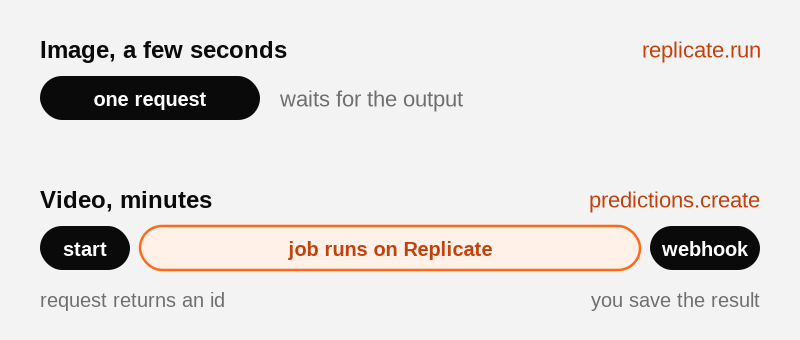
For a model that finishes in a few seconds, replicate.run is the simplest call. It creates a prediction, waits for it, and returns the output. Here I use black-forest-labs/flux-schnell, a fast image model. Models and their inputs change, so check the model's API page for the current input fields.
import Replicate, { type FileOutput } from "replicate";
import { getSession } from "@/lib/auth";
import { putObject } from "@/lib/storage"; // S3, R2 or Vercel Blob

const replicate = new Replicate({ auth: process.env.REPLICATE_API_TOKEN });

export async function POST(request: Request) {
  const session = await getSession();
  if (!session) return new Response("Sign in first", { status: 401 });

  const { prompt } = await request.json();
  if (typeof prompt !== "string" || prompt.length > 500) {
    return new Response("Prompt must be under 500 characters", { status: 400 });
  }

  const output = (await replicate.run("black-forest-labs/flux-schnell", {
    input: { prompt, num_outputs: 1, aspect_ratio: "4:3", output_format: "webp" },
    signal: request.signal,
  })) as FileOutput[];

  // FileOutput is a ReadableStream with blob() and url() helpers.
  const blob = await output[0].blob();
  const key = "images/" + session.userId + "/" + crypto.randomUUID() + ".webp";
  const url = await putObject(key, await blob.arrayBuffer(), "image/webp");

  return Response.json({ url });
}
Since version 1.0 of the client, file outputs come back as FileOutput objects, not plain URL strings. A FileOutput is a ReadableStream, so you can read it with blob(), pass it to a Response, or call url() for the underlying address. If older code expects strings, create the client with useFileOutput: false.
How to start long video jobs with Replicate webhooks
Video models can take a minute or more. Holding a request open that long is fragile and may hit your host's timeout. Instead, create the prediction, store its id, return right away, and let Replicate call your webhook when the job is done.
import Replicate from "replicate";
import { getSession } from "@/lib/auth";
import { db } from "@/lib/db";

const replicate = new Replicate({ auth: process.env.REPLICATE_API_TOKEN });

export async function POST(request: Request) {
  const session = await getSession();
  if (!session) return new Response("Sign in first", { status: 401 });

  const { prompt } = await request.json();
  if (typeof prompt !== "string" || prompt.length > 800) {
    return new Response("Bad prompt", { status: 400 });
  }

  const prediction = await replicate.predictions.create({
    model: "wan-video/wan-2.5-t2v-fast",
    input: { prompt, duration: 5 },
    webhook: process.env.APP_URL + "/api/replicate/webhook",
    webhook_events_filter: ["completed"],
  });

  await db.videoJob.create({
    data: { userId: session.userId, predictionId: prediction.id, status: "running" },
  });

  return Response.json({ jobId: prediction.id });
}
The model field works for official models that you call by name. For other models, pass version with the version id from the model's API page. webhook_events_filter: ["completed"] means one call at the end, whether the job succeeded, failed or was canceled.
Build the webhook URL from your own config, such as an APP_URL variable, not from request headers. The browser shows progress by polling your database for the job, not Replicate.
How to show progress while a video renders
Give the user something honest to look at. A small status route that returns the job's status from your database is enough, polled every few seconds from the client. Show "queued", "rendering" and "saving" as separate states, and tell people they can leave the page and come back, because the job keeps running on Replicate either way.
If you want finer progress, add "start" and "logs" to the events filter and store what arrives. Some models print step counts in their logs, and the package exports a parseProgressFromLogs helper for that. Most video models do not report useful progress, so do not promise a percentage you cannot measure.
How to verify Replicate webhooks in a Next.js route handler
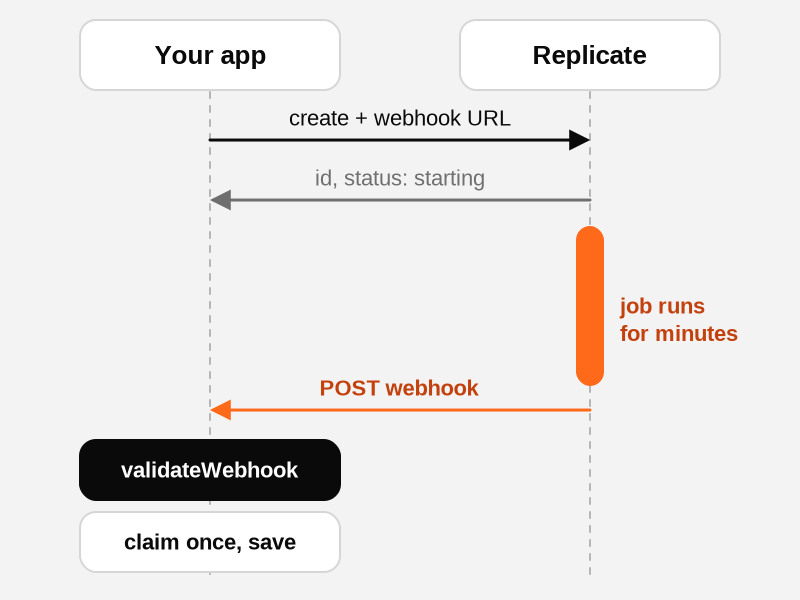
Anyone can POST to a public URL, so check the signature before you trust the body. The replicate package exports validateWebhook, which takes a standard Request and your signing secret. Get the secret once from the Replicate API (GET /v1/webhooks/default/secret) and keep it in an environment variable.
import { validateWebhook, type Prediction } from "replicate";
import { db } from "@/lib/db";
import { putObject } from "@/lib/storage";
import { releaseCredits } from "@/lib/credits";

export async function POST(request: Request) {
  const secret = process.env.REPLICATE_WEBHOOK_SIGNING_SECRET;
  if (!secret) return new Response("Webhook not configured", { status: 500 });

  // Validate a clone, so the original body can still be read below.
  const valid = await validateWebhook(request.clone(), secret);
  if (!valid) return new Response("Invalid signature", { status: 401 });

  const prediction = (await request.json()) as Prediction;

  // Claim the job once. A retry finds no running job and stops here.
  const claimed = await db.videoJob.updateMany({
    where: { predictionId: prediction.id, status: "running" },
    data: { status: "saving" },
  });
  if (claimed.count === 0) return new Response("ok");

  if (prediction.status === "succeeded" && typeof prediction.output === "string") {
    const file = await fetch(prediction.output); // a plain URL in webhook payloads
    const url = await putObject("videos/" + prediction.id + ".mp4", await file.arrayBuffer(), "video/mp4");
    await db.videoJob.update({ where: { predictionId: prediction.id }, data: { status: "done", url } });
  } else {
    await db.videoJob.update({ where: { predictionId: prediction.id }, data: { status: "failed" } });
    await releaseCredits(prediction.id);
  }

  return new Response("ok");
}
Two details matter here. Replicate can retry a webhook, so the handler claims the job with a conditional update and does nothing on a repeat. And failed jobs give the user's credits back, which I cover in a credits system for an AI app with Stripe.
Store outputs under keys you control, such as the user id and prediction id, and save the prompt, model name and cost next to each file. When a user reports a bad result, you can see exactly what produced it. Serve the files from your own bucket or CDN, never from the replicate.delivery URL.
How to stream text output from Replicate in Next.js
Language models on Replicate can stream tokens as server-sent events. replicate.stream returns an async iterator of events, and you forward the output events to the browser as a stream.
import Replicate from "replicate";
import { getSession } from "@/lib/auth";

const replicate = new Replicate({ auth: process.env.REPLICATE_API_TOKEN });

export async function POST(request: Request) {
  const session = await getSession();
  if (!session) return new Response("Sign in first", { status: 401 });

  const { prompt } = await request.json();
  const events = replicate.stream("meta/meta-llama-3-8b-instruct", {
    input: { prompt, max_tokens: 512 },
    signal: request.signal,
  });

  const encoder = new TextEncoder();
  const body = new ReadableStream({
    async start(controller) {
      try {
        for await (const event of events) {
          if (event.event === "output") controller.enqueue(encoder.encode(event.data));
          if (event.event === "error") throw new Error(event.data);
        }
        controller.close();
      } catch (error) {
        controller.error(error);
      }
    },
  });

  return new Response(body, { headers: { "Content-Type": "text/plain; charset=utf-8" } });
}
Pick a model from Replicate's streaming language models collection, and check its input names, since they differ between models. On the client, read the response with response.body.getReader() and append each chunk to the screen.
How much does the Replicate API cost?
Replicate bills in two main ways. Many official models have a fixed price per output, such as per image, per second of video or per token. Other public models bill for the GPU time your prediction uses, with a per second rate that depends on the hardware. Check the price on each model page, because the gap between a fast model and a high quality one can be large.
- Public models do not charge for setup or idle time, but a cold model can take a while to boot.
- Private models and deployments bill for all the time they are online, including idle time. Use them when you need steady speed and can keep them busy.
- Failed runs on standard models are not charged, but canceled runs on official models may be. Check the billing docs for your case.
In the product, the controls are the same as with any paid model: sign-in on every route, per user limits, input caps, credits or a paid plan, and a spend alert on your account. My fal.ai Next.js tutorial covers the same controls for fal, if you want to compare the two providers.
Wrapping up
The Replicate API in Next.js comes down to three calls: replicate.run for fast jobs, predictions.create with a verified webhook for long ones, and replicate.stream for text. Around them, keep the token on the server, save every output before it expires, and make each webhook safe to receive twice. If you want a generative product built on these patterns, with billing and guardrails from day one, see how I build AI products.
Frequently asked questions
How long does Replicate keep output files?
For predictions made through the API, Replicate deletes output files after about an hour, and the replicate.delivery URLs stop working. Predictions made in the web interface are kept until you delete them. If your app needs an output later, download it as soon as the prediction succeeds and store it in your own bucket.
Can I call the Replicate API from the browser?
Not safely. The Replicate API token gives full access to your account and billing, so it must stay in server environment variables. Call Replicate from a route handler or Server Action, check that the user is signed in and within limits, and send only the result back to the browser.
What is the difference between replicate.run and predictions.create?
replicate.run starts a prediction and waits for the output, which suits jobs that finish in seconds. replicate.predictions.create returns right away with a prediction id, and Replicate calls your webhook when the job changes. Use it for video, training and anything that may take longer than your server's request timeout.
How do I test Replicate webhooks locally?
Replicate must reach your webhook over a public HTTPS URL, so localhost will not work on its own. Use a tunnel such as ngrok or Cloudflare Tunnel and pass the tunnel URL as the webhook. Keep signature checks on in development too, so you test the same code path that runs in production.
Related guides




Next article
How to pin a section with ScrollTrigger in React
How to pin a section while a timeline plays, what pinSpacing and end values really do, why pins can fight React, and when CSS sticky is the better tool.
Read