AI Products
How to build an AI wrapper app that people pay for
What makes a wrapper worth paying for, the Next.js architecture I use, a streaming route you can copy, and the checklist I run before launch.
By Nabeel Mustafa··5 min read

Here is how to build an AI wrapper app that people pay for: pick one painful task, wrap a model call in a workflow that delivers a reliable result, and put the call behind a server route with limits, billing and evals. The model is the easy part. The product is the input you collect, the output you shape, and the guardrails around both.
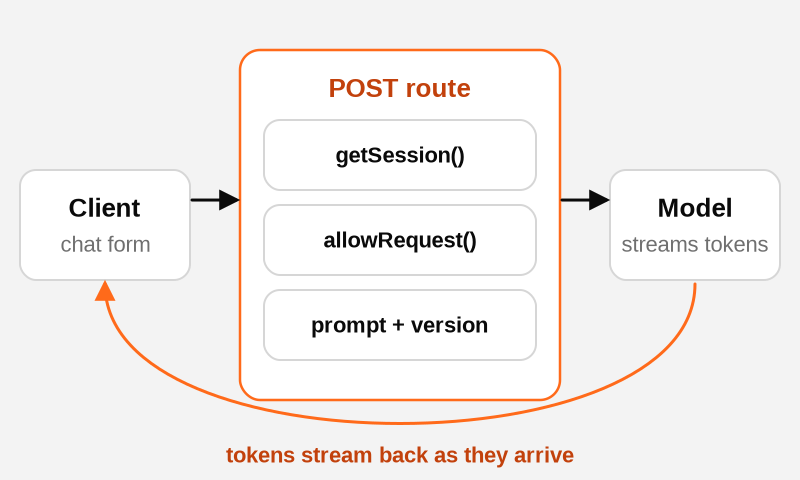
I start with the core of the architecture, because it is small, then cover what makes the product worth paying for.
How to build an AI wrapper app in Next.js: the streaming route
import OpenAI from "openai";
import { getSession } from "@/lib/auth";
import { allowRequest, recordUsage } from "@/lib/limits";
import { prompts } from "@/lib/prompts";

// Works with OpenAI or any OpenAI-compatible provider. Keys stay on the server.
const client = new OpenAI({
  apiKey: process.env.AI_API_KEY,
  baseURL: process.env.AI_BASE_URL, // leave unset for OpenAI
});

export async function POST(request: Request) {
  const session = await getSession();
  if (!session) return new Response("Sign in first", { status: 401 });

  const { input } = await request.json();
  if (typeof input !== "string" || input.length === 0 || input.length > 8000) {
    return new Response("Input must be 1 to 8000 characters", { status: 400 });
  }
  if (!(await allowRequest(session.userId))) {
    return new Response("Limit reached", { status: 429 });
  }

  const prompt = prompts.summarize; // versioned, see below
  const stream = await client.chat.completions.create(
    {
      model: process.env.AI_MODEL ?? "",
      stream: true,
      stream_options: { include_usage: true },
      max_completion_tokens: 1200,
      messages: [
        { role: "system", content: prompt.system },
        { role: "user", content: input },
      ],
    },
    { signal: request.signal }, // stop paying if the user leaves
  );

  const encoder = new TextEncoder();
  const body = new ReadableStream({
    async start(controller) {
      try {
        for await (const chunk of stream) {
          const text = chunk.choices[0]?.delta?.content;
          if (text) controller.enqueue(encoder.encode(text));
          if (chunk.usage) {
            await recordUsage(session.userId, prompt.version, chunk.usage);
          }
        }
        controller.close();
      } catch (error) {
        controller.error(error);
      }
    },
  });

  return new Response(body, {
    headers: { "Content-Type": "text/plain; charset=utf-8", "Cache-Control": "no-store" },
  });
}
This uses the official openai package and the chat completions API, which many providers also support. Point AI_BASE_URL at another provider and change AI_MODEL, and the route keeps working. The key never reaches the browser, and every call is tied to a signed-in user.
Three details matter. Passing request.signal stops generation when the user closes the tab, so you stop paying for tokens nobody reads. max_completion_tokens caps the cost of one call. And include_usage adds a final chunk with token counts, which you store per user and per prompt version.
What makes an AI wrapper app defensible?
"It is just a wrapper" is a fair criticism of a text box on top of a chat model. It is not a fair criticism of a product that owns a workflow. These are the four things that make a wrapper hard to copy:
- Workflow. The app does the steps around the model: it pulls the input from where it lives, shapes the output into the format the user needs, and sends it where it goes next. The model is one step of five.
- Data. Your users' saved examples, style guides, past edits and approvals make every new answer better for them. A general chat app does not have that context.
- UX for wrong answers. Edit, retry, compare and flag controls, built for one job. People pay for the product that makes fixing a bad output fast.
- Distribution. You reach a specific group of users through a channel you own: a community, an integration, an existing customer base. The model provider does not.
If none of the four apply, the product is a demo. That is fine to learn from, but do not charge for it yet. I go deeper into this in five questions to answer before you build an AI product.
How to version prompts and run evals on real inputs
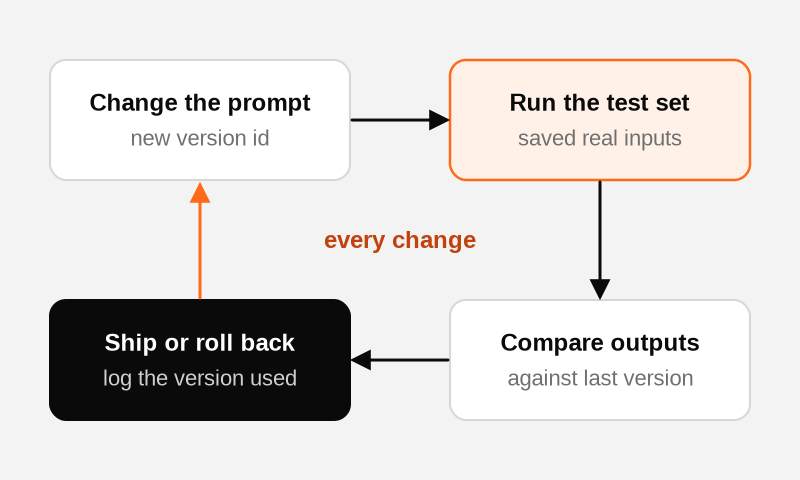
Treat prompts as code. Give each one a version, keep it in the repo, and record which version produced each output. When a user reports a bad answer, you can see exactly what the model was told.
export const prompts = {
  summarize: {
    version: "summarize@2026-10-12",
    system: [
      "You summarize customer support tickets for a busy team lead.",
      "Return three bullet points, then one line that starts with 'Next step:'.",
      "If the ticket is not in English, answer in English and say which language it was in.",
    ].join("\n"),
  },
} as const;
Then build an eval set: 20 to 50 real inputs with the output you would be happy to ship. Run the set on every prompt or model change and compare the results side by side. Some checks can be automatic (format, length, required fields). Others need a person to read them. Both are far better than guessing from a single demo.
Caching is the other quick win. If the same input and prompt version come in twice, return the stored output instead of paying again. Hash the input plus the prompt version as the cache key, so a new prompt version never serves old answers.
How to add billing and usage limits to an AI app
Every request costs you money, so billing is part of the architecture, not an add-on. Decide early between three models:
- Subscription with a fair use limit. Simple to sell. Works when usage per user is fairly even.
- Credits. Users buy packs or get a monthly grant, and each generation spends credits. Good when costs vary a lot per request.
- Metered billing. You report usage to your billing provider and charge at the end of the month. Good for business customers who expect an invoice.
I walk through a full credits ledger, Stripe Checkout and safe webhooks in credits and usage billing for an AI app with Stripe. Whatever you pick, enforce limits on the server before the model call, never only in the interface.
How to prevent abuse in an AI wrapper app
A model endpoint is attractive to abuse because someone else pays. The basic defenses are not hard:
- Sign-in required for every model call, with email verification before the free tier unlocks.
- Per user rate limits per minute and per day, plus a global daily budget for the whole app.
- Input length caps and output token caps on every route.
- Moderation on inputs and outputs if users can share results.
- Logs with user id, prompt version, tokens and cost, and an admin view to search them.
- A kill switch: one environment flag that disables generation without a deploy.
AI wrapper app launch checklist
- The eval set passes on the model and prompt version you are launching with.
- Keys live only in server environment variables, never in
NEXT_PUBLIC_variables. - Limits, caps and billing are enforced on the server.
- Failed calls show a clear message and do not charge the user.
- Cost per request is logged and a spend alert is set with your provider.
- You can see any user's requests in an admin view and refund them.
- Privacy policy and terms say which providers process user data.
- A small group uses it for a week before you open the doors.
Wrapping up
A wrapper app that people pay for is a workflow with a model inside it, not a model with a text box around it. The code is a server route that streams, caps cost and logs usage. The product is the workflow, the data and the care around wrong answers. If you want to know what this costs to build, read my AI MVP development cost breakdown, or see how I build AI products if you want it built with you.
Frequently asked questions
Is an AI wrapper app a real business?
It can be. Customers pay for a result, not for a model. If your app turns a messy task into a reliable result inside the tools people already use, the model underneath matters less. Wrappers fail when the whole product is one prompt and a text box, because the model provider can ship the same thing for free.
Which model should an AI wrapper app use?
Whichever wins on your own eval set at a cost your pricing can carry. Start with a capable general model to learn fast, then test smaller or cheaper models against the same real inputs. Keep the provider behind one module and read the model name from config, so switching is a small change.
How do I stop people from abusing my AI app?
Require sign-in before any model call, set per user limits by hour and by day, cap input length and output tokens, and add credits or a paid plan for heavy use. Watch for many accounts from one source, and keep a switch that turns generation off fast. Log every request with a user id so you can act on abuse.
Can I use an open source model instead of OpenAI?
Yes. Many hosts serve open models behind an OpenAI-compatible chat completions API, so the same SDK works with a different base URL and model name. Check each provider's limits, data terms and pricing. Open models can be cheaper per request, but you should test quality on your own inputs before you switch.
Related guides




Next article
Infinite marquee with GSAP in React (scroll-reactive)
A loop with no visible seam, speed that reacts to how fast you scroll, pause on hover and a reverse direction. Plus the CSS-only version and when it is all you need.
Read