Motion
Infinite marquee with GSAP in React (scroll-reactive)
A loop with no visible seam, speed that reacts to how fast you scroll, pause on hover and a reverse direction. Plus the CSS-only version and when it is all you need.
By Nabeel Mustafa··6 min read

To build a GSAP marquee infinite scroll effect in React, render the content twice in one row and animate that row to xPercent: -50 with ease: "none" and repeat: -1. When the first copy has moved fully out, the second copy sits exactly where the first one started, so the loop restarts with no visible jump. Everything else, like speed on scroll and pause on hover, is control of that one tween.
"use client";

import { useRef } from "react";
import { gsap, useGSAP, prefersReducedMotion } from "@/lib/gsap";

export default function Marquee({ children, speed = 40 }: { children: React.ReactNode; speed?: number }) {
  const track = useRef<HTMLDivElement>(null);

  useGSAP(
    () => {
      if (prefersReducedMotion()) return;
      gsap.to(track.current, { xPercent: -50, ease: "none", duration: speed, repeat: -1 });
    },
    { scope: track },
  );

  return (
    <div className="overflow-hidden">
      <div ref={track} className="flex w-max">
        <div className="flex shrink-0 items-center gap-10 pr-10">{children}</div>
        <div className="flex shrink-0 items-center gap-10 pr-10" aria-hidden>
          {children}
        </div>
      </div>
    </div>
  );
}
This is close to the marquee on my About page. speed is the number of seconds for one full loop, so a bigger number is slower. The rest of this post adds the parts that make it feel good to use.
How a GSAP marquee infinite scroll loop hides the seam
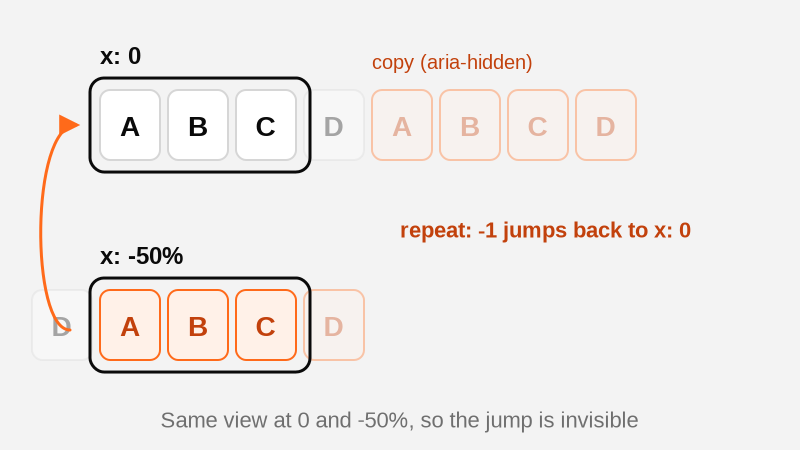
The track is two identical halves side by side, and w-max makes it as wide as both. Moving it by -50 percent moves it by exactly one half. At that point the view looks the same as at zero, so repeat: -1 can jump back without anyone seeing it.
Three details keep the seam hidden:
- Spacing lives inside each half. Use
pr-10on each copy instead of agapon the track. A gap between the halves is not part of either half, so -50 percent is off by half a gap. - `ease: "none"`. Any ease slows down at the end of each loop, and you see a stutter every cycle.
- Each half is wider than the screen. If one copy of your logos is only 800 pixels wide, repeat the items inside each half until it is wider than your widest layout.
The second copy has aria-hidden, so a screen reader reads the list once. If the items are links, also add tabIndex={-1} to the links in the copy, so keyboard users do not tab through every item twice.
How to change marquee speed with scroll velocity
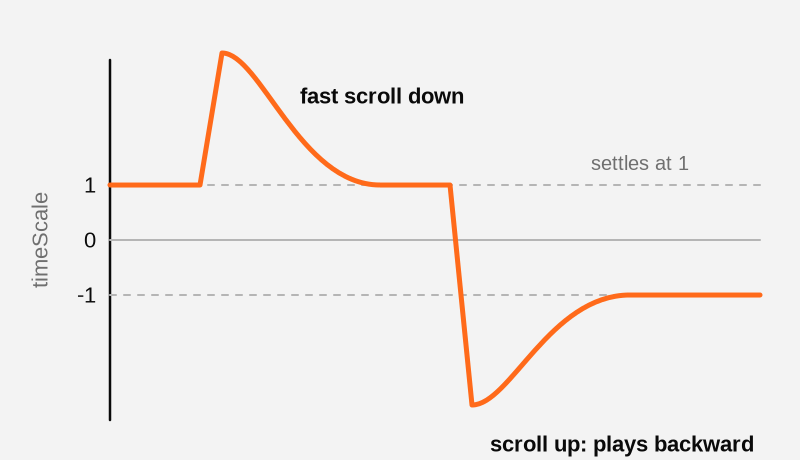
A nice touch is a marquee that speeds up while you scroll and follows the scroll direction. ScrollTrigger gives you both: self.getVelocity() returns the scroll speed in pixels per second and self.direction is 1 down or -1 up. ScrollTrigger comes from the same lib/gsap.ts file. You change the tween's timeScale, which is a speed multiplier. A negative value plays it backward.
useGSAP(
  () => {
    if (prefersReducedMotion()) return;
    const tween = gsap.to(track.current, { xPercent: -50, ease: "none", duration: speed, repeat: -1 });
    // Start far into the repeats, so playing backward never reaches time 0 and stops.
    tween.totalTime(tween.duration() * 1000);

    let boost: gsap.core.Timeline | undefined;
    ScrollTrigger.create({
      trigger: track.current,
      start: "top bottom",
      end: "bottom top",
      onUpdate(self) {
        const dir = self.direction;
        const extra = gsap.utils.clamp(0, 4, Math.abs(self.getVelocity()) / 500);
        boost?.kill();
        boost = gsap
          .timeline()
          .to(tween, { timeScale: dir * (1 + extra), duration: 0.2, ease: "power1.out" })
          .to(tween, { timeScale: dir, duration: 1, ease: "power2.out" });
      },
    });
  },
  { scope: track, dependencies: [speed] },
);
Two parts of this are easy to miss. First, a repeating tween played backward stops when it reaches the start, so I move the playhead 1,000 loops forward before anything runs. Second, the boost is a short timeline: a fast rise to the new speed, then a slow settle back to normal. Killing the old one before making a new one stops many timelines from fighting over the same value.
How to pause a marquee on hover
A hard pause looks like a bug. Ease the speed down instead, by tweening timeScale toward zero. On my site the marquee eases to a quarter of its speed (timeScale: 0.25), which still reads as alive but lets people read a logo. The snippet below goes all the way to zero.
const slow = () => gsap.to(tween, { timeScale: 0, duration: 0.5, overwrite: true });
const resume = () => gsap.to(tween, { timeScale: 1, duration: 0.5, overwrite: true });
track.current!.addEventListener("pointerenter", slow);
track.current!.addEventListener("pointerleave", resume);
If you combine hover with scroll velocity, keep a hovered flag and skip the boost while it is true. Otherwise a scroll during hover starts the marquee again under the pointer. Also remove both listeners in the useGSAP cleanup.
Hover does not exist on touch screens, and it is not a pause control for keyboard users. If the marquee runs next to content people read, add a real pause button that sets tween.paused(true). That is what WCAG 2.2.2 (Pause, Stop, Hide) asks for.
Reverse direction and pause off screen
For a marquee that runs right to left by default and left to right in a second row, give the second row a starting timeScale(-1) and the same far-forward totalTime trick. To save battery, pause it when it leaves the screen: the marquee on this site creates the tween with paused: true and uses a ScrollTrigger onToggle to play it only while it is in view.
const tween = gsap.to(el, { xPercent: -50, ease: "none", duration: speed, repeat: -1, paused: true });
ScrollTrigger.create({
  trigger: el,
  start: "top bottom",
  end: "bottom top",
  onToggle: (self) => (self.isActive ? tween.play() : tween.pause()),
});
Marquee and reduced motion
A marquee that never stops is a problem for people with vestibular disorders. In every snippet above the first line is a reduced motion check. When it is true, nothing animates and the content sits still. Make sure the still version looks finished: let the row scroll sideways with overflow-x: auto, or wrap the items into a grid. A row cut off at the screen edge with no way to see the rest is a broken layout, not a calm one.
If you have several motion pieces on one page, gsap.matchMedia() is a cleaner way to handle this than a check in each component. I cover it in reduced motion with GSAP matchMedia.
Is a CSS-only marquee enough?
Often, yes. If the marquee only loops and pauses on hover, CSS does it with no JavaScript at all, and it keeps running while scripts load.
.marquee-track {
  display: flex;
  width: max-content;
  animation: marquee 40s linear infinite;
}
.marquee:hover .marquee-track {
  animation-play-state: paused;
}
@keyframes marquee {
  to {
    transform: translateX(-50%);
  }
}
@media (prefers-reduced-motion: reduce) {
  .marquee-track {
    animation: none;
  }
}
Use GSAP when you need control at runtime: speed tied to scroll velocity, a smooth slow-down instead of a hard stop, a direction that follows the user, pausing when off screen, or a marquee that is part of a larger scroll timeline. If the site already loads GSAP for other work, as most of mine do (see GSAP in the Next.js App Router), the GSAP version costs you nothing extra.
Wrapping up
An infinite marquee is one tween: two identical halves, xPercent: -50, ease: "none", repeat: -1. Keep the spacing inside the halves, hide the copy from screen readers, ease speed instead of stopping it, and give reduced motion users a still layout that still works. If you want motion like this designed and built for your site, see how I work on motion.
Frequently asked questions
Why does my marquee jump at the end of each loop?
The two copies are not the same width, or the gap between them is not part of the copies. Put the spacing inside each half (padding on the right of each copy, not a gap between them), make sure both halves have identical content, and animate xPercent: -50 so the jump lands on a pixel that looks the same.
How many times should I duplicate the marquee content?
Two copies are enough when one copy is at least as wide as the screen. If your content is short, repeat the items inside each half until one half is wider than the widest screen you support. The track still holds exactly two halves and still moves by -50 percent.
Is a marquee bad for accessibility?
It can be. Moving content that runs longer than five seconds next to other content needs a way to pause it under WCAG 2.2.2. Add a pause button, hide the duplicate copy from screen readers with aria-hidden, and stop the motion when the user asks the OS for reduced motion.
Can I drag a GSAP marquee?
Yes, with the Draggable plugin or Observer, both free in the gsap package. Read the drag delta and add it to the tween progress, then wrap the value. For most logo strips this is not worth it; dragging is useful when the marquee holds cards people want to look at.
Related guides

Next article
How to build an AI image generator: a fal.ai Next.js tutorial
A working image generator in the App Router: a locked-down proxy, a form with live queue progress, and a server route that keeps every image you pay for.
Read