AI Products
How to build an AI image generator: a fal.ai Next.js tutorial
A working image generator in the App Router: a locked-down proxy, a form with live queue progress, and a server route that keeps every image you pay for.
By Nabeel Mustafa··6 min read
This fal.ai Next.js tutorial builds a small, real image generator: a prompt form, live queue progress, and saved results. You install @fal-ai/client and @fal-ai/server-proxy, add one route that keeps your API key on the server, and call fal.subscribe from a client component. Then you lock the route down, because an open proxy is an open bill.
I use Next.js 16 with the App Router and TypeScript. The same steps work on any recent Next.js version that has route handlers.
npm install @fal-ai/client @fal-ai/server-proxy

# .env.local (server only, never NEXT_PUBLIC_)
FAL_KEY="your_key_id:your_key_secret"
fal.ai Next.js tutorial: how the proxy route works
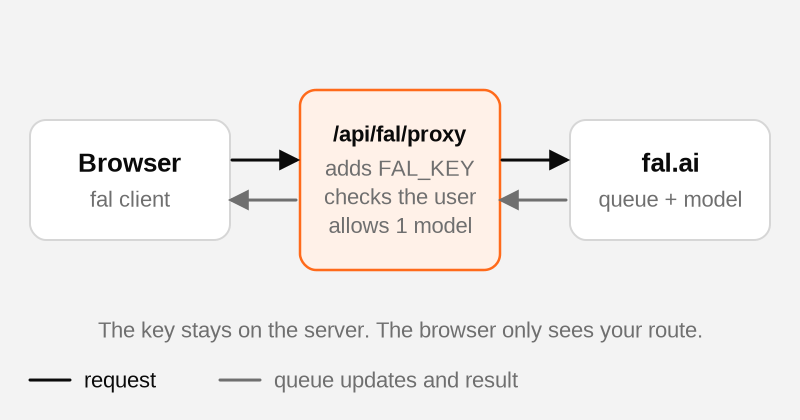
The browser should never hold your fal key. Instead, the fal client sends each request to your own route, and that route adds the key and forwards the call to fal. The official package ships a ready handler for the App Router, so the route file can be three lines.
Three lines is fine for a demo but not for production. By default the proxy forwards calls to any fal endpoint and does not check who is calling. The current package lets you fix both: allowedEndpoints limits which models can be called, and isAuthenticated plus allowUnauthorizedRequests: false rejects anyone who is not signed in.
import type { NextRequest } from "next/server";
import { createRouteHandler } from "@fal-ai/server-proxy/nextjs";
import { getSession } from "@/lib/auth"; // your auth, e.g. reads a session cookie
import { allowGeneration } from "@/lib/limits"; // your rate limit and credit check

const proxy = createRouteHandler({
  // Only the models this app actually uses.
  allowedEndpoints: ["fal-ai/flux/schnell"],
  // Reject calls from people who are not signed in.
  allowUnauthorizedRequests: false,
  isAuthenticated: async () => Boolean(await getSession()),
});

// GET and PUT are used for status checks and uploads.
export const { GET, PUT } = proxy;

// POST starts a generation, so it is where limits belong.
export async function POST(request: NextRequest) {
  const session = await getSession();
  if (!session) return new Response("Sign in first", { status: 401 });

  const allowed = await allowGeneration(session.userId);
  if (!allowed) return new Response("Limit reached", { status: 429 });

  return proxy.POST(request);
}
How to call fal.subscribe from a Next.js client component
fal.subscribe submits the job to fal's queue and waits for the result. While it waits, onQueueUpdate reports the status: IN_QUEUE with a queue position, then IN_PROGRESS with logs, then COMPLETED. That is enough to show honest progress instead of a spinner with no information.
I use fal-ai/flux/schnell here because it is fast and cheap, which is what you want while building. Models on fal change often, so check the model page for the current id and input fields before you copy this.
"use client";

import { useState } from "react";
import { fal } from "@fal-ai/client";

fal.config({ proxyUrl: "/api/fal/proxy" });

export function ImageForm() {
  const [prompt, setPrompt] = useState("");
  const [status, setStatus] = useState("");
  const [image, setImage] = useState<string | null>(null);
  const [busy, setBusy] = useState(false);

  async function generate(event: React.FormEvent) {
    event.preventDefault();
    setBusy(true);
    setImage(null);
    try {
      const result = await fal.subscribe("fal-ai/flux/schnell", {
        input: { prompt, image_size: "landscape_4_3", num_images: 1, enable_safety_checker: true },
        logs: true,
        onQueueUpdate(update) {
          if (update.status === "IN_QUEUE") setStatus("In queue, position " + update.queue_position);
          if (update.status === "IN_PROGRESS") setStatus("Generating...");
        },
      });

      // Ask the server to keep a copy. It fetches the result itself.
      const saved = await fetch("/api/images", {
        method: "POST",
        headers: { "Content-Type": "application/json" },
        body: JSON.stringify({ requestId: result.requestId }),
      });
      if (!saved.ok) throw new Error("Could not save the image");
      const { url } = await saved.json();
      setImage(url);
      setStatus("");
    } catch {
      setStatus("Something went wrong. Try a different prompt.");
    } finally {
      setBusy(false);
    }
  }

  return (
    <form onSubmit={generate}>
      <textarea value={prompt} onChange={(e) => setPrompt(e.target.value)} maxLength={500} required />
      <button disabled={busy}>{busy ? "Working..." : "Generate"}</button>
      {status && <p aria-live="polite">{status}</p>}
      {image && <img src={image} alt={prompt} />}
    </form>
  );
}
Note the maxLength on the prompt and the aria-live on the status line. The first keeps prompts within a size you expect. The second lets screen readers hear the progress.
How to save fal.ai images to your own storage
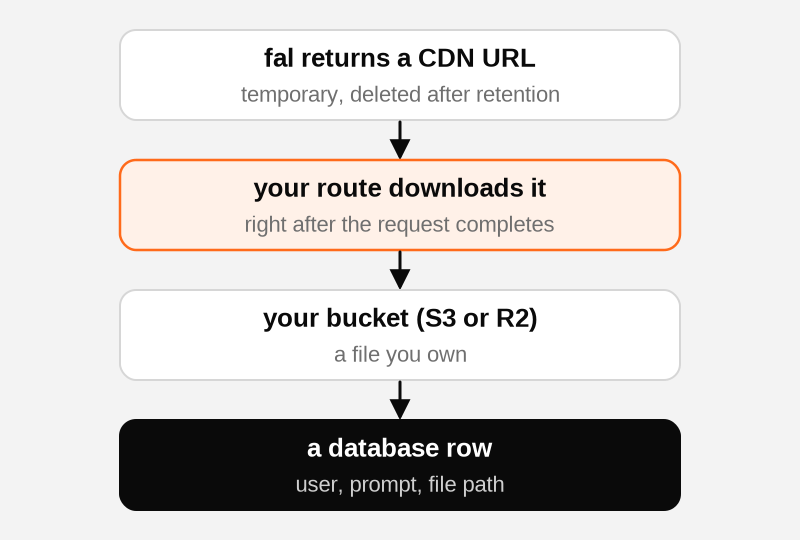
The URL fal returns points to fal's CDN, and those files are kept under a retention policy, not forever. If a user comes back next month to an image that has been deleted, that is a broken product. So every image you show as "saved" should be copied to storage you control.
Do not let the browser send you an image URL to save. A client could send any URL, and your server would fetch it. Send the requestId instead, and let the server ask fal for the result with its own key. That way you only ever store real outputs from your own account.
import { createFalClient } from "@fal-ai/client";
import { getSession } from "@/lib/auth";
import { putObject } from "@/lib/storage"; // S3, R2 or Vercel Blob
import { db } from "@/lib/db";

const fal = createFalClient({ credentials: process.env.FAL_KEY });

export async function POST(request: Request) {
  const session = await getSession();
  if (!session) return new Response("Sign in first", { status: 401 });

  const { requestId } = await request.json();
  if (typeof requestId !== "string") return new Response("Bad request", { status: 400 });

  const result = await fal.queue.result("fal-ai/flux/schnell", { requestId });
  const image = result.data.images[0];
  if (!image || result.data.has_nsfw_concepts?.[0]) {
    return new Response("Image not available", { status: 422 });
  }

  const file = await fetch(image.url);
  const key = "images/" + session.userId + "/" + requestId + ".jpg";
  const url = await putObject(key, await file.arrayBuffer(), "image/jpeg");

  await db.image.create({ data: { userId: session.userId, requestId, url } });
  return Response.json({ url });
}
Store the requestId with a unique index. If the same request is saved twice, the second insert fails and you do not store a duplicate. In a real app I also check that the request belongs to the user, by recording request ids when the proxy POST succeeds.
How to control cost and rate limit an AI image generator
Every image costs money, and a public form is an invitation to run up your bill. These are the controls I put in on day one, before anyone outside the team sees the page:
- Signed-in users only. The proxy rejects anonymous calls, as shown above.
- An allowlist of models.
allowedEndpointsstops someone from calling an expensive video model through your key. - Per user limits. Count generations per user per hour and per day, in your database or a store like Redis. Return a 429 when the limit is hit.
- Credits for paid plans. Reserve a credit before the job and settle it after. I cover the full ledger in a credits system for an AI app with Stripe.
- Fixed input where you can. Set image size and image count on the server side of your product logic, not from free form user input.
- A spend alert and a kill switch. Set a budget alert in your fal account and keep an environment flag that turns generation off without a deploy.
One honest limit of the proxy: it forwards the input the browser sends. If input control matters a lot for your product, move the call into a route handler or Server Action that builds the input itself, and use the proxy only for status updates.
How to handle moderation for AI generated images
If users can type any prompt, some will type things you do not want to host. Moderation works best in layers, and none of them is perfect alone.
- Check the prompt before you submit it, with a moderation model or a simple blocklist for your domain.
- Keep the model's safety checker on. For FLUX models on fal,
enable_safety_checkeris an input andhas_nsfw_conceptscomes back with the result. - Do not save or show images that fail the check. The save route above already refuses them.
- Log prompts with user ids, and give yourself a way to suspend an account.
- Add a report button on every public image, and review reports quickly.
Write down what your product allows before launch. It is much easier to enforce a rule that exists than to invent one during an incident.
Wrapping up
The working core of this tutorial is small: a locked proxy route, a client form that calls fal.subscribe, and a server route that copies each result into your own storage. The real product work is in the limits, the moderation and the paths for when a generation fails. If you would rather compare providers first, my guide to the Replicate API in Next.js covers the same flow with webhooks.
I have built generative AI products in production across image, video, 3D and audio models, and the hard parts are always the ones around the model. If you want a product like this built properly, with billing, guardrails and an admin from day one, see how I build AI products.
Frequently asked questions
Is fal.ai free to use?
No. fal.ai charges per request or per unit of output, and the price depends on the model. You can test in the playground and with small amounts of credit, but every generation your app makes costs money. Check the pricing on each model page before you pick one, because prices differ a lot between fast and high quality models.
Can I call fal.ai from a Server Action instead of the proxy?
Yes. On the server, create a client with createFalClient and your FAL_KEY, then call fal.subscribe inside a Server Action or route handler. You lose live queue updates in the browser unless you stream them yourself, but you get full control over input. Many apps use the proxy for fast feedback and the server for anything sensitive.
Which fal.ai model should I use for images?
Start with a fast, low cost model such as fal-ai/flux/schnell while you build, then compare two or three stronger models on real prompts before launch. fal adds and retires models often, so check the model gallery for current ids, prices and input fields. Pick the one that wins on your own test prompts, not the one with the best demo.
Do fal.ai image URLs expire?
Treat them as temporary. Output files live on fal's CDN under a retention policy, and expired files are deleted for good. You can set retention per request or per account, but the safe pattern is to copy every image you want to keep into your own storage, such as S3 or Cloudflare R2, as soon as the request completes.
Related guides



Next article
Website project brief template (free, with a filled example)
A copyable template with eight short sections, a filled example for a fictional SaaS, and the mistakes that make a brief useless.
Read