Websites
Next.js vs Webflow for startups: which to pick for your website
Webflow wins more often than developers admit. Next.js wins when the site has to do more than explain. Here is how I decide, with costs over two years.
By Nabeel Mustafa··5 min read

Next.js vs Webflow for startups comes down to one question: is your website only a marketing site, or will it share code, design and data with your product? If it is only marketing and a non-technical team must edit it every week, Webflow is often the better choice. If the site needs app features, deep custom motion, or content from your own database, Next.js is.
I build in Next.js, so read this with that in mind. I still recommend Webflow to some founders, and I explain when below.
Who edits the content after launch?
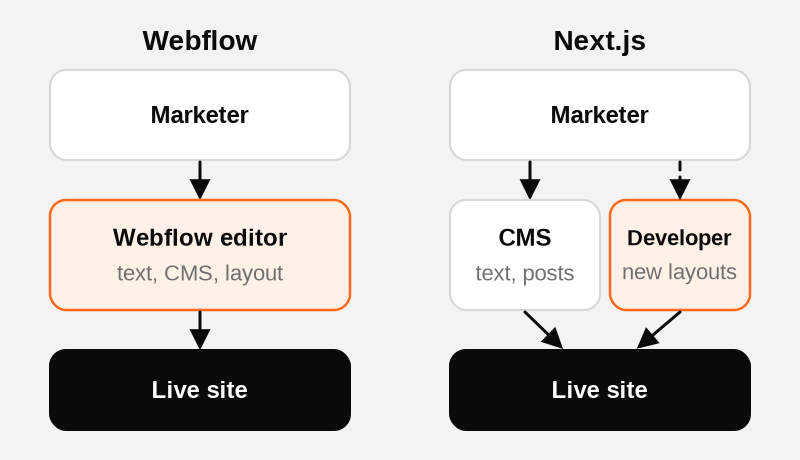
This is the first question I ask, because it decides more than any technical detail. In Webflow, a designer or marketer edits text, images and CMS items in the browser, and a trained designer can also change layouts visually. Nobody waits for a developer.
In Next.js, editors use a headless CMS (Sanity, Contentful, Payload and others), or the content lives in code. Editing copy and blog posts is easy with a CMS. Adding a new kind of section or changing a layout needs a developer. If your marketing team changes landing pages every week, that difference matters a lot.
How fast can you launch?
For a marketing site of five to ten pages, both can launch in a similar time, because design and content take most of the calendar. Webflow saves time on hosting, forms and the CMS setup, since they come built in. Next.js saves time when you already have a React design system from your product, because the site can reuse those components.
Where Next.js is clearly slower is the very first small site with no existing code. Where Webflow is clearly slower is anything that needs logic: sign-in, dashboards, calculators that call your API, gated content tied to your own users.
Next.js vs Webflow for startups: cost over two years
Design and build cost is roughly comparable for the same design, because the designer's hours are the same either way. The difference is in running costs and in who pays for changes. Here is a rough two-year view for one marketing site. Prices are in USD from each vendor's pricing page in October 2026. They change often, so check webflow.com/pricing and vercel.com/pricing before you decide.
Webflow
- Basic site plan: $15 a month billed yearly ($25 billed monthly). No CMS, so no blog. About $360 over two years.
- Premium site plan (with CMS, up to 20,000 CMS items): $25 a month billed yearly ($39 billed monthly). About $600 over two years.
- Workspace plans for staging, code export and more collaboration: Core is $19 a month and Growth is $49 a month, billed yearly. Many small teams start on the free Workspace.
- Changes: mostly done by your own team, so low ongoing developer cost.
Next.js
- Hosting on Vercel Pro: $20 a month, which includes $20 of usage credit. About $480 over two years for a small site that stays within the credit. Other hosts work too.
- Headless CMS: many have a free tier for small teams, with paid plans as you add editors. Budget from $0 to a few hundred dollars a year.
- Changes: layout changes need a developer. If you assume 2 to 4 hours a month at $100 to $150 an hour, that is about $4,800 to $14,400 over two years.
So on running costs alone, Webflow is usually cheaper for a pure marketing site. Next.js earns its cost when the site does work that Webflow cannot, or when the same team already builds your product in React. For more on what moves a website budget, see what actually drives the cost of a website.
Is Next.js or Webflow better for SEO and custom features?
Performance and SEO
Both can be fast, and both can rank. Webflow serves pages from a CDN and gives you control over titles, descriptions, canonical tags, sitemaps and redirects. Next.js gives you more control over what JavaScript ships, how images load and how pages are rendered, which helps when you push for strong Core Web Vitals on heavy pages.
The real SEO difference is scale. If you plan to generate thousands of pages from data (integrations, templates, locations, comparisons), Next.js reads that data from anywhere and builds the pages for you. Webflow's Premium plan caps CMS items at 20,000, and the structure of each page is limited to what its CMS fields can express.
Custom motion and app features
Webflow has a visual interactions panel, and Webflow now owns GSAP, so you can add GSAP through custom code as well. For reveals, hovers and scroll effects, this is enough for most marketing sites.
Next.js is better when motion is the product story: pinned scroll sequences tied to state, page transitions, WebGL, or animation that reacts to live data. It is also the only real option when the site needs app features such as authentication, payments, AI features or a user dashboard. In Webflow those live in a separate app, and you maintain two codebases anyway.
CMS limits, hiring and migrating later
- CMS limits. Webflow's CMS is easy and well designed, but it has item and collection limits per plan, and relations between collections are simple. A headless CMS with Next.js has fewer limits and more setup.
- Hiring. There are many good Webflow designers, and they can design and build in one tool. Next.js needs a developer, usually working with a designer. If you have no developers and do not plan to hire one, that settles it.
- Migrating later. Moving from Webflow to Next.js is common and manageable: content exports as CSV or through the API, templates get rebuilt, and you set redirects. The cost is the rebuild, not the content.
When I recommend Webflow (and when Next.js)
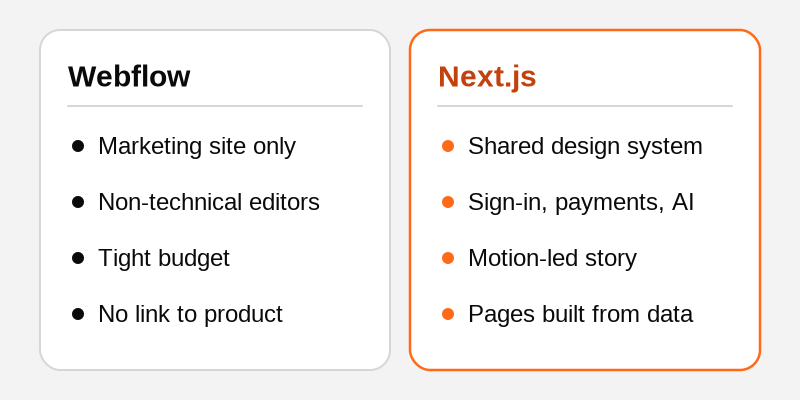
I recommend Webflow when the site is marketing only, the team that edits it is not technical, the budget is tight, and nothing on the site needs to talk to your product. Pre-seed and seed startups with one product and a small team often fit this exactly. A good Webflow site launched this month beats a perfect Next.js site launched next quarter.
I recommend Next.js when the site and product share a design system, when you need sign-in, payments or AI features on the site, when motion carries the story, or when you plan programmatic pages at scale. If you are not sure which group you are in, write down what the site has to do with the free Brief builder. The answer is usually clear from the feature list. And if you are still deciding how big the site should be, read landing page or full website.
Wrapping up
Pick Webflow when your site explains and your team edits. Pick Next.js when your site also does things, or shares code with your product. If you decide on Next.js and want it built properly, with a CMS your team can use, see how I work on web development.
Frequently asked questions
Is Webflow good for SEO?
Yes. Webflow outputs clean HTML, lets you set titles, descriptions and canonical tags per page, generates a sitemap and supports redirects. A well-built Webflow site can rank as well as a Next.js site. SEO depends far more on content, internal links and page speed than on the platform you build with.
Can I export my Webflow site to Next.js?
Not directly. Webflow can export static HTML, CSS and JavaScript on a paid Workspace plan, and CMS content can be exported as CSV or read through the API. A move to Next.js still means rebuilding the templates as React components. The content moves over, the layouts get rebuilt.
Is Next.js free to use?
Next.js itself is free and open source. You pay for hosting and any services you add. Vercel's Hobby plan is free but only for personal, non-commercial use, so a startup site normally needs Pro or another host. A headless CMS may also cost money once your team grows.
Can a non-technical team edit a Next.js website?
Yes, if the site is connected to a headless CMS such as Sanity, Contentful or Payload. Editors then work in a web interface and never touch code. What they cannot do without a developer is change layouts or add new kinds of sections, which Webflow lets a trained designer do visually.
Related guides




Next article
Using the Replicate API in Next.js: images, video and streaming
Server routes that run image models, start long video jobs with signed webhooks, stream text, and keep every output before it expires.
Read