Motion
GSAP page transitions in Next.js (App Router)
Enter animations with template.tsx, a full overlay wipe that covers the old page before the new one loads, and where View Transitions fit in.
By Nabeel Mustafa··Updated ·5 min read

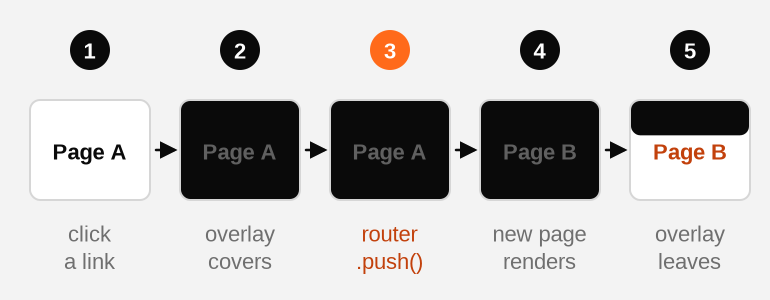
GSAP page transitions in Next.js come in two shapes. The easy one is an enter animation: put a client template.tsx in your app folder, and since it remounts on every route change, useGSAP can animate each new page in. The full one is an overlay wipe: catch the link click, animate a panel over the screen, call router.push() when it is covered, then reveal the new page.
How to animate page enters with template.tsx
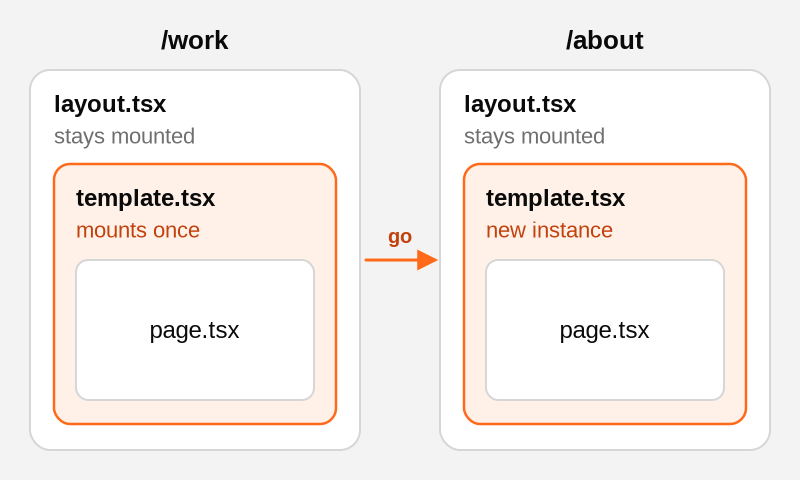
A template.tsx file is like a layout, but it gets a new key on each navigation, so its children remount and effects run again. That makes it the right place for an enter animation. Mark it as a client component and animate the wrapper.
"use client";
import { useRef } from "react";
import { gsap, useGSAP } from "@/lib/gsap";

// The first load is a full page render: the HTML is already on screen,
// so animating it in would cause a flash. Only animate client navigations.
let firstLoad = true;

export default function Template({ children }: { children: React.ReactNode }) {
  const ref = useRef<HTMLDivElement>(null);

  useGSAP(() => {
    if (firstLoad) {
      firstLoad = false;
      return;
    }
    const mm = gsap.matchMedia();
    mm.add("(prefers-reduced-motion: no-preference)", () => {
      gsap.fromTo(
        ref.current,
        { y: 24, autoAlpha: 0 },
        { y: 0, autoAlpha: 1, duration: 0.6, ease: "power3.out", clearProps: "transform" },
      );
    });
  }, { scope: ref });

  return <div ref={ref}>{children}</div>;
}
Three details make this work. useGSAP runs before paint on the client, so a client navigation never shows the page before the tween starts. The firstLoad flag skips the server-rendered first visit. And clearProps: "transform" removes the transform when the tween ends, because a transformed parent breaks position: fixed and can break sticky elements inside it.
Why the App Router has no exit animations
An exit animation needs the old page to stay on screen while it animates out. In the App Router, a navigation is a React transition: Next.js fetches the new page, then swaps it in when it is ready. The old page unmounts at that moment, and there is no hook that lets you hold it back.
Libraries like Motion's AnimatePresence work by keeping removed children mounted until their exit finishes. People have tried wrapping the router with it, but it relies on freezing internal Next.js context, which breaks between versions. I do not ship that on client sites.
So the reliable approach is to run the exit before navigation starts. The old page stays put, you cover it, and only then do you ask the router to move. The new page then appears under the cover, and you reveal it. To the user it reads as one continuous movement, even though the old page never animated out on its own.
How to build an overlay wipe with GSAP and router.push
The pattern has three pieces: a provider in the root layout that owns a full-screen overlay, a function that covers the screen and then calls router.push(), and a link component that calls that function instead of navigating right away.
"use client";
import { createContext, useContext, useRef } from "react";
import { usePathname, useRouter } from "next/navigation";
import { gsap, useGSAP } from "@/lib/gsap";

const TransitionContext = createContext<(href: string) => void>(() => {});
export const usePageTransition = () => useContext(TransitionContext);

export default function TransitionProvider({ children }: { children: React.ReactNode }) {
  const overlay = useRef<HTMLDivElement>(null);
  const covering = useRef(false);
  const router = useRouter();
  const pathname = usePathname();

  const { contextSafe } = useGSAP();

  const navigate = contextSafe((href: string) => {
    const reduce = window.matchMedia("(prefers-reduced-motion: reduce)").matches;
    if (reduce) return router.push(href);
    if (covering.current) return;
    covering.current = true;
    gsap.fromTo(
      overlay.current,
      { scaleY: 0, transformOrigin: "50% 100%" },
      { scaleY: 1, duration: 0.5, ease: "power3.inOut", onComplete: () => router.push(href) },
    );
  });

  // The pathname changes once the new page has rendered: reveal it.
  useGSAP(() => {
    if (!covering.current) return;
    gsap.to(overlay.current, {
      scaleY: 0,
      transformOrigin: "50% 0%",
      duration: 0.6,
      ease: "power3.inOut",
      onComplete: () => {
        covering.current = false;
      },
    });
  }, { dependencies: [pathname] });

  return (
    <TransitionContext.Provider value={navigate}>
      {children}
      <div
        ref={overlay}
        aria-hidden
        className="pointer-events-none fixed inset-0 z-100 bg-neutral-950"
        style={{ transform: "scaleY(0)" }}
      />
    </TransitionContext.Provider>
  );
}
The link uses the onNavigate prop of next/link. It only fires for client-side navigation, so Cmd or Ctrl clicks that open a new tab, external URLs and download links behave normally. Calling e.preventDefault() cancels the default navigation, and the provider takes over.
"use client";
import Link from "next/link";
import { usePathname } from "next/navigation";
import { usePageTransition } from "./TransitionProvider";

type Props = React.ComponentProps<typeof Link> & { href: string };

export default function TransitionLink({ href, ...props }: Props) {
  const navigate = usePageTransition();
  const pathname = usePathname();

  return (
    <Link
      href={href}
      {...props}
      onNavigate={(e) => {
        // Same path (only a hash or query change): let Next.js handle it,
        // because the pathname would not change and the overlay would stay.
        if (new URL(href, window.location.href).pathname === pathname) return;
        e.preventDefault();
        navigate(href);
      }}
    />
  );
}
Wrap {children} in TransitionProvider in app/layout.tsx, then use TransitionLink in the navbar and anywhere else you want the wipe. Because it renders a real next/link, prefetching still works, so the new page is often ready by the time the cover finishes. router.push() also scrolls to the top by default. If you use Lenis, reset its position on route change as well, which I cover in Lenis smooth scroll in Next.js.
For the GSAP setup this code assumes, such as the shared lib/gsap.ts file and contextSafe, see how to set up GSAP in the Next.js App Router.
Should you use View Transitions instead of GSAP?
Next.js 16 can hook route changes into the browser's View Transitions API through React's <ViewTransition> component. You turn it on with experimental: { viewTransition: true } in next.config.ts and import ViewTransition from react. Elements that share a name on the old and new page morph between their positions, and you style the animation with CSS pseudo-elements.
import type { NextConfig } from "next";

const nextConfig: NextConfig = {
  experimental: {
    viewTransition: true,
  },
};

export default nextConfig;
Its strength is exactly what the App Router lacks: the browser captures the old page as an image, so it can animate out while the new one animates in, with no tricks, and it also runs on back and forward. A thumbnail that grows into a hero image is far easier this way than with GSAP.
The limits: the flag is still experimental in Next.js 16, so the API can change. The animations are CSS, so you lose GSAP's timelines and easing control. Browsers without support simply skip the animation, which is a fine fallback. My rule today: View Transitions for shared-element morphs, GSAP for a branded wipe or a choreographed sequence.
How to keep GSAP page transitions in Next.js accessible
- Respect reduced motion. Both examples above skip the animation when
prefers-reduced-motion: reduceis set. - Keep it short. A cover of 0.4 to 0.6 seconds feels intentional. Longer than that and people feel they are waiting for your site.
- Mark the overlay
aria-hiddenand give itpointer-events: none, so it never traps clicks or confuses a screen reader. - Keep real links.
TransitionLinkrenders an<a>with a realhref, so keyboard users, crawlers and middle clicks all work. - Let the router do its job. The App Router announces the new page to screen readers after
router.push(), so never replace real navigation with a custom DOM swap.
Wrapping up
Start with a template.tsx enter animation. It is a few lines and gives every route change a sense of continuity. Add the overlay wipe when the brand calls for it, and use View Transitions when you want elements to morph between pages. If you want transitions like these designed for your site, see how I work on motion.
Frequently asked questions
Do page transitions slow down navigation in Next.js?
An overlay wipe adds the length of the cover animation before the route starts loading, so keep it short, around 0.4 to 0.6 seconds. Links still prefetch in the background, so the new page is often ready by the time the cover finishes. Enter-only animations in template.tsx add no delay, because they run after the page has rendered.
Do GSAP page transitions work with the browser back button?
The back button does not go through your link handler, so the overlay cover does not run. The page still changes, and a template.tsx enter animation still plays because the template remounts. Most sites accept this. If you need the full effect on back, the View Transitions route is better, because it runs on every navigation.
Can I use Motion's AnimatePresence for exit animations in the App Router?
Not reliably. AnimatePresence needs the old page to stay mounted while it animates out, but the App Router swaps the page as soon as the new one is ready. Workarounds that freeze the router context depend on Next.js internals and break between versions. An overlay wipe or View Transitions avoids the problem.
Will page transitions affect SEO?
No, as long as the content is in the server-rendered HTML. Crawlers do not click links and wait for animations, they load each URL directly. Keep real <a> tags through next/link, and do not hide content behind an animation that only runs after a client navigation, because the first visit is a full page load.
Related guides



Next article
AI MVP development cost in 2026: a real breakdown
Price ranges by scope, what pushes the number up, what the product costs to run each month, and where you can cut without hurting the launch.
Read